Balcony Garden Wall Art Laser Cut File
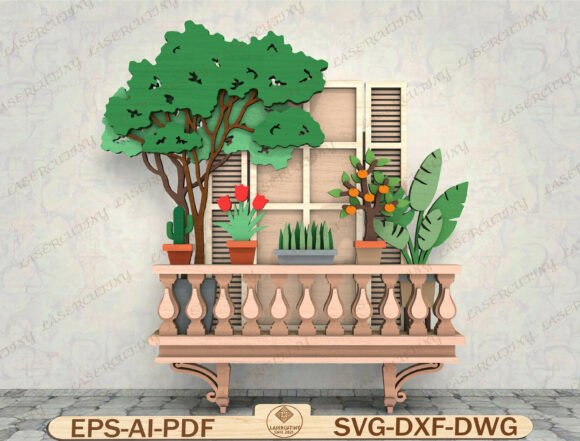
Imagine bringing the sun-drenched charm of a Mediterranean terrace right into your home with a single, stunning piece of art. The Balcony Garden Wall Art Laser Cut File is a digital design asset that transforms simple wood or acrylic into a multi-layered, dimensional masterpiece. It captures the cozy essence of a blooming balcony, complete with intricate railing details, window shutters, and a delightful array of potted plants—from cheerful tulips and hardy cacti to a miniature orange tree.
This isn't just a flat image; it's a blueprint for creating tactile, textured wall décor. As a digital download, you receive the design files instantly, ready to be cut on your laser machine. The result is a piece of art with incredible depth, where each layer—from the foreground greenery to the background shutters—builds a captivating scene. It’s a perfect project for those who love DIY layered wood art and want to add a personal, handmade touch to their space.
Creative Uses for Your Laser Cut Design
The versatility of this design file is one of its strongest points. It’s more than just garden wall décor; it’s a versatile design asset that can be adapted for numerous projects. Consider it for:
- Personalized Gifts: Create a unique housewarming gift or a special present for a plant lover. A custom-made piece always feels more thoughtful.
- Themed Home Décor: It’s ideal for spring home décor or adding a touch of farmhouse wall art to a living room, kitchen, or sunroom.
- Event Decorations: For a garden-themed party or wedding, these laser-cut elements can be used as centerpieces, table numbers, or photo backdrop details.
- Small Business Merchandise: If you have a laser cutting business, this file can be used to create a line of sellable Mediterranean décor items.
Tips for Selecting and Using the Design
When you download the Balcony Garden Wall Art Laser Cut File, you’ll get a package of high-quality digital files in multiple formats like SVG, DXF, and AI. This ensures compatibility with a wide range of software and machines, including Glowforge, xTool, Cricut, and Silhouette Designer Edition. Here’s how to get the most out of it:
First, check the file compatibility with your specific laser cutter or cutting machine software. Next, consider your material. The design works beautifully in wood (like birch plywood or MDF), but you could also experiment with acrylic for a more modern look or even layered paper for a delicate shadow box effect. Plan your color palette by choosing complementary stains or paints for each layer to make the details pop. Finally, review the assembly; a good design will include clear layering instructions to help you achieve that perfect dimensional effect.
Choosing the right design file is similar to choosing the right typeface for a branding project. The wrong choice can feel off, while the right one elevates the entire work. This particular design offers a cohesive, professional aesthetic that’s hard to achieve from scratch. It provides a polished and professional result, whether you’re creating a single piece of art or producing items for sale.
Ultimately, this laser cut file is about unlocking creativity. It gives you a sophisticated starting point that you can customize, adapt, and make your own. It’s a practical creative asset that helps you produce beautiful, tangible objects, bridging the gap between digital design and physical craftsmanship. For anyone looking to add a warm, botanical touch to their projects, it’s a resource well worth exploring.